
Brain Test 2 Level 143: Andy must release his two friends.
Brain Test 2 Level 143
Screenshots
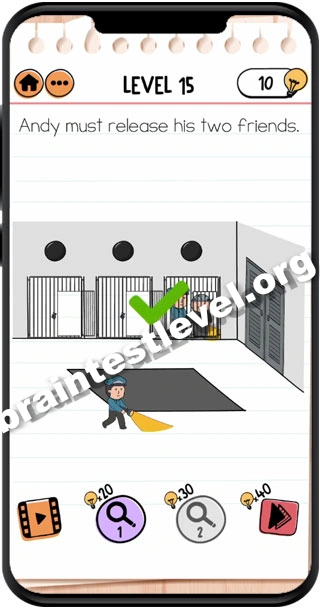
Quick Answer
Open the right cell by tapping on the black button above its door. One guard gets occupied. Now open the other two cells. They must not get caught.
Skills Tested
Step-by-Step Solution
- 1) Tap the black button above the right cell door.
- 2) Let the guard become occupied over there.
- 3) Open the other two cells.
- 4) Make sure the friends are not caught.
- 5) All of them escape safely.
Hint
Reveal a hint
Use the black button to distract one guard, then free the other two cells quickly.
Why It Works
Order and timing decide success here. Releasing the right cell first ties up a guard, giving you the opening to unlock the other two cells while everyone escapes without being seen.
Frequently asked questions
How do I solve Brain Test 2 Level 143?
Tap the black button above the right cell, then open the other two cells carefully so nobody gets caught.
What is the answer to Brain Test 2 Level 143?
Tap the black button to open the right cell, then unlock the other two cells without anyone getting caught.
What is the trick in Brain Test 2 Level 143?
Open the right cell first because it occupies a guard, which gives you the cover to free the other two cells.
Why do I need to open the right cell first in Brain Test 2 Level 143?
The right cell distracts one guard when opened, buying time to open the other two cells without being caught.
Is there a video walkthrough for Brain Test 2 Level 143?
Yes. The embedded clip shows the button and the best order for opening the cells.
How do I avoid getting stuck in Brain Test 2 Level 143?
Always free the right cell first to occupy the guard, then open the remaining two and move quickly.